Nvidia greenboost: transparently extend GPU VRAM using system RAM/NVMe (gitlab.com)
450 points by mmastrac 4 days ago
0xbadcafebee 20 hours ago
You can already do this with some GPU drivers:
GRUB_CMDLINE_LINUX_DEFAULT="quiet splash amdttm.pages_limit=5242880 ttm.pages_limit=5242880"
In any case, loading a gigantic model just to use system RAM is absurdly slow (due to mem bandwidth), like 1-5 t/s, so it's not practical. It'd take a whole day to process one 86k token request. Just pay a cloud provider $0.01 to do it in 10 seconds.
jmward01 18 hours ago
The point is not how fast it is now. The point is that this opens new possibilities that can be built on. Potentially models that are trained with slightly different architectures to optimize to this use case. Possibly others come to improve this path. Possibly HW manufacturers make a few small adjustments that remove bottlenecks. Who knows, the next person may combine CPU compute with this mem sharing to get another token a second. Then the next person does predictive loading into memory to keep that bandwith 100% maxed and usable. Then the next does and the next does. Before you know it there is a real thing there that never existed.
This is a great project. I love the possibilities it hints at. Thanks for building it!
smallnamespace 17 hours ago
It’s architecturally not a good approach. System RAM is much slower so you should put data that doesn’t need to be used often on it. That knowledge is at the application layer. Adding a CUDA shim makes system RAM appear like VRAM, which gets things to run, but it will never run very well.
The benchmarks at the bottom mention memory tiering and manually controlling where things go, but if your application already does that, then you probably don’t also need a CUDA shim. The application should control the VRAM to system memory transfers with boring normal code.
jbverschoor 12 hours ago
jmward01 4 hours ago
timnetworks 15 hours ago
midnitewarrior 15 hours ago
adrian_b 7 hours ago
With discrete GPUs, using system RAM is slow not due to mem bandwidth, but due to PCIe bandwidth, which is the bottleneck.
For example, 16x PCIe 4.0: 256 Gb/s, 16x PCIe 5.0: 512 Gb/s, while 2x DDR5-6400 DIMMs: 819 Gb/s. The actual throughput is lower for both PCIe and DDR5, due to communication overhead.
On server/workstation motherboards which may have 4, 8 or 12 DIMMs instead of 2, the ratio between memory bandwidth and PCIe bandwidth becomes proportionally higher, so the memory throughput achievable by the GPU becomes a very small fraction of the system memory bandwidth.
Tsiklon 7 hours ago
The difference between DDR4 and 5 is quite substantial. I have a fully loaded Cascade Lake Mac Pro - 6 channels of DDR4-2933 gets me to about 120GB/s or 960Gb/s. PCIe 3.0 is a major Achilles heel of what would be a capable workstation system with modern nvidia GPUs precisely for the reason you document.
zozbot234 7 hours ago
> slow not due to mem bandwidth, but due to PCIe bandwidth, which is the bottleneck.
> On server/workstation motherboards ... the memory throughput [to system RAM] achievable by the GPU becomes a very small fraction of the system memory bandwidth.
Yes, this is a critical point. It means that this is only realistically useful for prefill, which is compute- and not memory-bandwidth bound.
shdudns 7 hours ago
lelanthran 14 hours ago
> any case, loading a gigantic model just to use system RAM is absurdly slow (due to mem bandwidth), like 1-5 t/s, so it's not practical. It'd take a whole day to process one 86k token reques
So don't use it for large requests. Ideal for when you just want to categorise things, for example, "does this task need a shell" or "bucket this email into one of help request, bill due or personal comms".
zozbot234 13 hours ago
The best use is actually for a layer that "almost fits" into VRAM, such that automated offloading to system RAM will be rare enough that it doesn't impact performance.
usrusr 7 hours ago
robotswantdata 8 hours ago
12 channel ddr5 5600 ECC is around 500gbs which in real world works very well for large MoE
adrian_b 7 hours ago
You mean 500 GB/s, not Gb/s (actually 537 GB/s).
Unfortunately that does not matter. Even in a cheap desktop motherboard the memory bandwidth is higher than of 16-lane PCIe 5.0.
Therefore the memory bandwidth available to a discrete GPU is determined by its PCIe slot, not by the system memory.
If you install multiple GPUs, in many MBs that will halve the bandwidth of the PCIe slots, for an even lower memory throughput.
robotswantdata 3 hours ago
zargon 3 hours ago
RobotToaster 12 hours ago
Would MoE models work better with this approach?
rnrn 4 hours ago
Why is there a new kernel driver here at all? It appears that all it does it allocate system RAM (“DDR4”) and export it as a dmabuf for import to cuda as mapped external memory. Then a userspace shim hijacks APIs to use that if gpu memory is full. cuda already supports allocating mapped system memory, so AFAICT this could be implemented in the userspace shim with no new kernel driver.
Also as other commenters have mentioned, redirecting allocations to managed memory would also enable similar oversubscription
And the hijack approach only makes sense for making apps have this behavior with no changes, and could be done with minor app changes (e.g. PyTorch has a pluggable allocator interface). App changes also enable intentionally placing specific allocations.
My impression is that this is vibe from beginning to end, starting from a design that only makes sense if you are hallucinating
Melatonic 2 hours ago
Maybe theres a significant latency advantage to doing it this way?
Or, as you said, making everything backwards compatible that is not being regularly updated
daneel_w 21 hours ago
Related, a couple of years ago: https://old.reddit.com/r/Amd/comments/15t0lsm/i_turned_a_95_...
"I turned a $95 AMD APU into a 16GB VRAM GPU and it can run stable diffusion!"
3abiton 20 hours ago
> it can generate a 50 steps 512x512 image around 1 minute and 50 seconds.
I have the 4650G APU, and the best way to describe it is: lacking of support. This was even more true 3 yo than now. rocm (is) was absolutely dogshit then, I know this because I tried to do the same when that post was made. You have to compile everything from scratch, get the relevant patches, and even then, xformers which is a library that accelerate diffusion model inferencing was not supported for renoir or rocm back then. Yes, you can generate an image, but it was much slower, and rigged with bugs. You couldn'rt update rocm because it broke compatibility, and it was partly the reason I got into nixos. That being said, those APUs are a power house. Nowadays I can run decent agentic workflows on them (I have 64gb of ddr4 ram, ie APU can suck as much as it needs with the latest linux kernels).
Just note, diffusion models are still second class citizens on AMD apus even GPUs. But then again, nothing close right now on the market except for what apple offers.
nl 20 hours ago
The Ryzen AI CPU/GPUs (Ryzan AI 395+ etc) seem to have increasing support - https://lemonade-server.ai/ now has support for the NPU as well as the combined CPU/GPU (which I guess is a APU but is different to the G series of APUs I think?)
But I'm always interested in first hand experiences of how good is it really - I'm pretty cynical about the idea that AMD actually knows what it takes to build good software end-to-end.
3abiton 19 hours ago
zozbot234 13 hours ago
nl 19 hours ago
This is really interesting engineering, but I agree with the other commentators that the benchmarking makes it hard to understand the contribution various factors are having.
The ExLlamaV3 EXL3 2bpw (8 GB, full VRAM) row is an order of magnitude faster than the baseline - but the baseline seems to be the 32GB model running with the KV cache shared to system memory only (I think?)
But if a 8GB model gives sufficient quality then it seems like that would have worked without the shared memory thing?
I think the useful apples-to-apples benchmark is currently the Ollama + GreenBoost shim (baseline) (2-5 tps) vs ExLlamaV3 + GreenBoost cache (8–20 tps) comparison.
It would be really useful to see this compared with the existing llama CPU/memory offload. There is a note at the start ("Offload layers to CPU — works, but drops token/s by 5–10× because CPU RAM has no CUDA coherence") - but it is unclear if that 5-10x token speed drop is compared to running a model completely in GPU or compared to the greenboost approach.
I think it is vs GPU, in which case it seems likely the performance is similar to what greenboost is giving but probably much more stable.
kristianp 17 hours ago
ExLlamaV3 EXL3 2bpw is likely the 30b parameter GLM 4.7 Flash quantised down to 2 bits, the unstated assumption is that you need to check the 2bpw quantisation works well enough for your use case.
The reported size of the ModelOpt FP8, 16 GB, sounds wrong to me. If its 8 bits per parameter it is going to be a similar size to the glm-4.7-flash:q8_0. They repeat this a few times in the readme.
aruametello 6 hours ago
Post traumatic "nvidia TurboCache" disorder triggered.
https://en.wikipedia.org/wiki/TurboCache
(Not the same thing 1:1, but worth the joke anyway)
yjtpesesu2 21 hours ago
How does this differ from anything llama.cpp offers, regarding offloading layers? The repo consistently refers to "DDR4". Is there a reason DDR5 won't work with this?
svnt 20 hours ago
The readme opens with this:
> I have an RTX 5070 with 12 GB VRAM and I wanted to run glm-4.7-flash:q8_0, which is a 31.8 GB model. The standard options are:
> Offload layers to CPU — works, but drops token/s by 5–10× because CPU RAM has no CUDA coherence. You end up waiting. Use a smaller quantization — you lose quality. At q4_0 the model is noticeably worse on reasoning tasks.
> Buy a bigger GPU — not realistic for consumer hardware. A 48 GB card costs more than a complete workstation.
> None of those felt right, so I built an alternative: route the overflow memory to DDR4 via DMA-BUF, which gives the GPU direct access to system RAM over PCIe 4.0 without a CPU copy involved.
And then limps home with this caveat on the closest thing to a benchmark:
> The PCIe 4.0 link (~32 GB/s) is the bottleneck when the model overflows VRAM. The best strategy is to shrink the model until it fits — either with EXL3 quantization or ModelOpt PTQ — and use GreenBoost's DDR4 pool for KV cache only.
I think the reason it refers it to DDR4 is because that is how the user explained it to their coding agent. LLMs are great at perpetuating unnecessary specificity.
moffkalast 10 hours ago
Given that 32 GB/s is significantly worse than CPU to RAM speeds these days, does the additional compute really make it any faster in practice? The KV cache is always on the GPU anyway unless you're doing something really weird, so it won't affect ingestion, and generation is typically bandwidth bound. With something like ×16 PCIe 6.0 it would actually make sense, but nothing less than that, or maybe for smaller dense models that are more compute bound with 8x PCIe 6.0 or 16x 5.0 but that's already below DDR5 speeds.
zozbot234 9 hours ago
segmondy 8 hours ago
I was wondering the same, but llama.cpp was written to offload to system ram. If this really works, then the advantage could be that one could run transformers / sglang, etc or other tools that don't offload to system ram. However, I want to see the numbers. Perhaps I'll give this a try, but I need a throw away box I could trash if something goes wrong, but have none at the moment.
kcb 20 hours ago
CUDA has had managed memory that pages between VRAM and system RAM for a decade. Problem is doing so is unusably slow for AI purposes. Seems like an unnecessary layer here.
hrmtst93837 11 hours ago
That slowness is almost useful. It makes the failure mode obvious instead of letting a 'transparent' layer hide it until some sloppy alloc or tensor blowup starts paging through system RAM or NVMe and the whole job turns into a smoke test for your storage stack.
For actual training, explicit sharding and RAM mapping are ugly, but at least you can see where the pressure is and reason about it. 'Transparent' often just means performance falls off a cliff and now debugging it sucks.
yjtpesesu2 20 hours ago
[dead]
xienze 20 hours ago
Presumably it means that software doesn’t have to write the same sort of layer offloading support. It’ll “just work” as if you had X GB of VRAM all along.
yjtpesesu2 20 hours ago
so, magic?
Havoc 20 hours ago
> The best strategy is to shrink the model until it fits — either with EXL3 quantization or ModelOpt PTQ — and use GreenBoost's DDR4 pool for KV cache only.
Does this make sense? I'd have thought the KV is guaranteed to be used 100% of the time while say in a MoE the same can't be said of the weights.
Though I suppose if you're shooting for huge context then having that allocation go into ram makes sense specially when its allocated but not used yet
alexeldeib 17 hours ago
KV cache is, well, a cache that can fill up and trigger eviction. You require enough space to execute at least 1 fwd pass of 1 request at your context length. KV cache hits reduce TTFT by avoiding prefill. You don’t get to skip decode.
MoE is kinda related in terms of lower usage requirements vs a dense model of same total param size, but I think your mental model is a bit off.
zozbot234 13 hours ago
KV cache is also eminently swappable if you have fast storage, since it mostly sees small append-only writes per token - it's not rewritten continuously like the activations. (I believe it's even better if you use cached input tokens across requests, since that portion of KV cache can then be recycled and save a single ~KV-cache sized write per request.) Accessing swapped-out cache may be slow, but it's highly preferable to not having that cache amount at all and recomputing from scratch.
ma2kx 20 hours ago
The physical bottleneck to system memory remains. Therefore, I assume that better results are achieved by manually adjusting which layers are offloaded.
I would prefer to use system memory to cache different models, focusing on things like embedding, rerankers, and TTS. This is sufficient to run a more complex RAG locally, for example, via Mem0, and then use a larger LLM via the cloud.
ninjagoo 7 hours ago
This is awesome! Normally, offloading layers to the CPU RAM means that the compute for those layers occurs on the CPU instead of the GPU, generally speaking. The CPU is orders of magnitude slower than the GPU.
With this approach the compute occurs on the GPU, with the tradeoff that layers in RAM have to be moved back-and-forth through PCI-DMA. It seems to me that this should offer a speedup vs compute split between GPU and CPU. The amount of speedup will depend on how many layers would have been on CPU compute, minus the reduction due to moving those layers between RAM and the GPU.
What's slower? Compute on the CPU or moving data from RAM to GPU through PCI-DMA?
152334H 11 hours ago
Nobody mentioning how this project is vibecoded slop?
> The code is really bad with completely uneeded parts. The LLM (Qwen 2.5 7B) has hardcoded the i9 14700KF topology, and has variables related to it never used... It's even funnier that the show hardware function always prints the same string. There are even random pip log files. Why did this slop got coverage here?
paseante 3 hours ago
[dead]
wewewedxfgdf 8 hours ago
Why don't they just put ram slots on the card so you can augment the fast ram
M95D 8 hours ago
Speed and reliability. A connector of any kind reduces signal quality. Data lines need to be longer, because the memory slot won't fit under the radiator where the memory chips are now, and that adds even more electrical interference and degrades signal.
Also, we had memory slots on '90s cards. They were extremely expensive and proprietary. Ever saw a Matrox VRAM card? I never did.
Gracana 3 hours ago
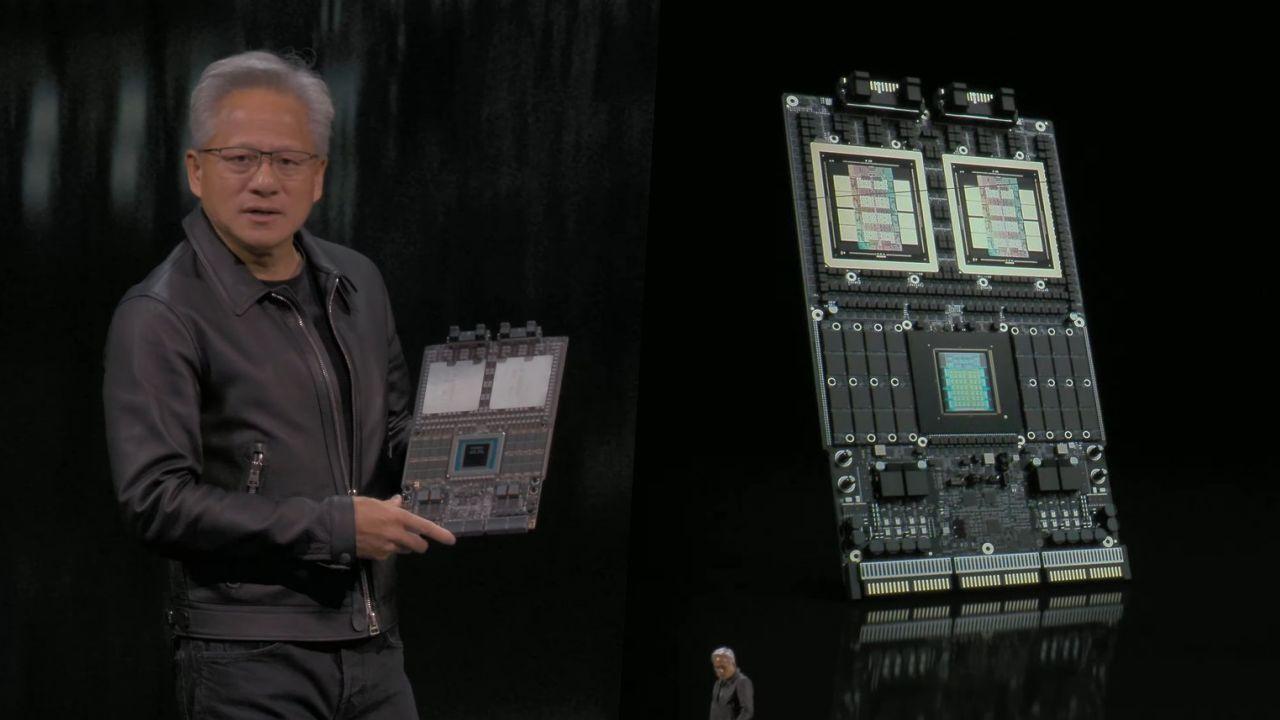
SOCAMM2 could work. Nvidia's using it on the Vera Rubin boards, as seen here: https://www.pchardwarepro.com/wp-content/uploads/2025/11/que...
whalesalad 3 hours ago
I am hoping that we seriously evolve the ATX standard to allow for a socketed GPU board that can also enable user replaceable memory. Seeing an enormous GPU that is larger than the motherboard itself hanging from a PCI slot feels like horse and buggy shit. I'm imaging two boards back-to-back connected by a central high bandwidth bus (which could also do power delivery) that would allow one side of the case to be for CPU/RAM and the other side to be for GPU/VRAM.
HighGoldstein 8 hours ago
> A connector of any kind reduces signal quality.
Like the M.2 connector?
> Data lines need to be longer
Like the data lines going all the way to an on-motherboard storage device?
literalAardvark 7 hours ago
zbentley 7 hours ago
adrian_b 7 hours ago
VHRanger 8 hours ago
GDDR7x doesn't come in dimm factor?
In general soldered ram seems to get much higher bandwidth than removeable ram. See ryzen AI Max vs 9950x max ram throughputfor example
nic547 6 hours ago
Strix Halo uses a 256bit memory interface, the normal desktop processors only have a 128bit interface, that's the biggest difference in bandwidth. For more bandwidth you need to go to a Threadripper.
Strix Halo seems to use LPDDR with 8000 MT/s, which is a bit faster than the usual 5600 MT/s-6400 MT/s "normal" DDR5-DIMMs (Albeit (expensive) faster ones seem to exist), so there's a slight edge towards soldered memory (not sure about LPCAMM2 and similar tech).
GDDR7 is a different league, a 5070 Ti also has a 256bit memory interface, but has 896GB/s bandwidth, compared to strix halo with 256GB/s
VHRanger 4 hours ago
adrian_b 4 hours ago
No.
All GDDR memory is intended only for being soldered around a GPU chip, on the same PCB. This is how they achieve a memory throughput that is 4 to 8 times higher than the DDR memories used in DIMMs or SODIMMs.
wewewedxfgdf 7 hours ago
We are talking here about slower ram to augment.
timmmmmmay 8 hours ago
connectors are bad for signal integrity and GDDR is particularly picky about this
wewewedxfgdf 7 hours ago
We're talking about ordinary RAM to augment, like a cache.
Not as GPU VRAM expansion.
yjftsjthsd-h 21 hours ago
Previously: https://news.ycombinator.com/item?id=47384557
(Still cool, still would benefit from better benchmarks)
armada651 17 hours ago
Doesn't Windows already do this by default? I can already run models bigger than my GPU VRAM and it will start using up to 50% of my system RAM as "shared memory". This is on a Desktop PC without a shared memory architecture.
nickjj 9 hours ago
Yep I had a GeForce 750 Ti (2 GB) and I was able to run a ton of things on Windows without any issues at all.
As soon as I switched to Linux I had all sorts of problems on Wayland where as soon as that 2 GB was reached, apps would segfault or act in their own unique ways (opening empty windows) when no GPU memory was available to allocate.
Turns out this is a problem with NVIDIA on Wayland. On X, NVIDIA's drivers act more like Windows. AMD's Linux drivers act more like Windows out of the box on both Wayland and X. System memory gets used when VRAM is full. I know this because I got tired of being unable to use my system after opening 3 browser tabs and a few terminals on Wayland so I bought an AMD RX 480 with 8 GB on eBay. You could say my cost of running Linux on the desktop was $80 + shipping.
A few months ago I wrote a long post going over some of these details at https://nickjanetakis.com/blog/gpu-memory-allocation-bugs-wi.... It even includes videos showing what it's like opening apps both on Wayland and X with that NVIDIA card.
Yokohiii 17 hours ago
The nvidia windows driver enables RAM swapping by default.
Great way to backstab you if you prefer inference speed.
3836293648 17 hours ago
I don't think Windows does this, but Ollama does
whywhywhywhy 9 hours ago
It's the drivers but it was a relatively recent addition, think it was added when either the 30xx or 40xx series shipped and the lower cards had pitiful VRAM so they enabled it by default so they'd work with all games.
Most people who know it does this turns it off because it kicks in too early so if you have 24GB it'll offload to RAM and tank your inference speed when you hit around 22GB use.
https://nvidia.custhelp.com/app/answers/detail/a_id/5490/~/s...
lastdong 8 hours ago
dahart 5 hours ago
The Nvidia driver has used system memory fallback for a couple of years now.
https://nvidia.custhelp.com/app/answers/detail/a_id/5490/~/s...
nodja 17 hours ago
NVIDIA's GPU drivers on windows 100% do this

dwroberts 10 hours ago
The title here needs changing, this is for nvidia cards but it is not an official project and has nothing to do with them
(Feels especially deceptive when there is another top story right with the headline “nvidia nemoclaw” which is an official project)
Insanity 19 hours ago
Extend your VRAM using RAM, then extend your RAM using Swap.
system2 16 hours ago
And burn the swap pagesys file to a rewritable DVD to complete the cycle. It will be super fast that way.
krige 14 hours ago
Extend your RAM using RAM Doubler!
FooBarWidget 13 hours ago
Then extend your disk space using DoubleSpace/DriveSpace!
lossyalgo 9 hours ago
Datagenerator 13 hours ago
SV_BubbleTime 18 hours ago
If you are doing video models, this is an excellent way to murder your SSD.
Do not put swap on an SSD you care about at all.
zozbot234 13 hours ago
You can of course monitor SMART wearout indicators to check whether this is happening. Casual use of swap for non LLM-use is actually fine since "cold" ephemeral data will be swapped out first and that will never get written to; KV cache is mostly fine since it's similarly append-only so writes are tolerably small; but yes, more general LLM inference totally breaks that limited-writes pattern and will wear out/kill your media.
Insanity 17 hours ago
I was writing it somewhat tongue-in-cheek and not as a serious suggestion. But thanks for adding the disclaimer, that's good advice!
duskdozer 11 hours ago
zram swap otoh should be relatively 'free'
zozbot234 11 hours ago
rvz 15 hours ago
> Do not put swap on an SSD you care about at all.
This.
Many people rediscovering what the purpose of swap files are, but will still find a way to abuse it without knowing that they are actually destroying their SSD.
lokimoon 8 hours ago
[dead]
paultendo 21 hours ago
Could be a very useful way to do some overnight tasks using spare RAM. Possibly things like LLM-based categorisation, labelling, data cleansing. That's what comes to mind for me anyway.
MaxikCZ 10 hours ago
Neat part is every task becomes overnight task when you start offloading to RAM.
undefined 12 hours ago
yalogin 5 hours ago
Is there a use case for this today? Feels more like nvidia is priming the software hoping system designers will find ways to use it.
bguberfain 6 hours ago
"A watchdog kernel thread monitors RAM and NVMe pressure and signals userspace before things get dangerous." - which kind of danger this type of solution can have?
dr_kretyn 6 hours ago
Is there a similar initiative for AMD?
angry_octet 7 hours ago
I have a system with an ungodly amount of Optane memory and I'm hoping this will work.
Rafuino 5 hours ago
What do you have? I've got a 905P and a 900P and am already using these in LM Studio by putting all models there and extending system memory with more scratch space... Not sure if I need to do anything differently with this since LM Studio already enabled it I think
bhewes 21 hours ago
This has been fun we can task our nemotron-3-super model to run over night when our desktops are idle. 4070s and 96gb of ram works fine. Slow but does it's job.
sabareesh 20 hours ago
I wish it provided benchmark comparing Direct RAM offload vs CPU offload vs Full VRAM
undefined 8 hours ago
felipe_aramburu 18 hours ago
How does this relate to cuCascade https://github.com/nvidia/cucascade
Berazu 10 hours ago
I wish there was a way to extend RAM/NVMe with GPU VRAM. :(
nuopnu 10 hours ago
There are vram disks, so at least you can use it for the swap.
tandr 4 days ago
Some simpler benchmark table would be great. May I suggest Ollama on base machine, Ollama with T1, Ollama with T1+T2 etc. on midsize and big models to compare token/sec?
bandrami 10 hours ago
Qu'ils mangent de la brioche
pabs3 4 days ago
Would be great to get this into mainline Linux.
brador 11 hours ago
Could this work on steam deck?
aplomb1026 20 hours ago
[dead]
ajaimk 20 hours ago
[dead]
Heer_J 5 hours ago
[dead]
NooneAtAll3 15 hours ago
nvidia failed to provide gpu with actually meaningful amount of vram
and instead of improving the actual product, it decided to "solve the problem in software"
I expect this greenboost to fall and burn, honestly...
cma 15 hours ago
> it decided to "solve the problem in software"
This isn't made by nvidia
shmeeed 8 hours ago
Still kinda true, though. As other commenters have pointed out, their Windows drivers do similar stuff.
holoduke 21 hours ago
The is extremely slow and not useful in my opinion.
daneel_w 21 hours ago
It makes the difference between being able to run a lot of machine learning tasks, and not being able at all. Pretty useful.
majorchord 21 hours ago
I would say it depends entirely on your usecase. I don't think there can be a simple "not useful" generalization that applies to everyone.
jauntywundrkind 21 hours ago
Man I wish that was a canned response that could be deployed on demand! Well said.
I really appreciate thriftful & resourceful points of view. Exploring what if, looking for use is such a great virtue.
bigwheels 21 hours ago
Can you elaborate beyond the shallow/superficial dismissal?
whywhywhywhy 9 hours ago
If it takes seconds in VRAM it can take tens of minutes running the same thing offloaded to RAM if it hasn't been designed to do it.
ozgrakkurt 13 hours ago
It is about as useful as rtx
sayYayToLife 21 hours ago
[dead]