H.264 Is Magic (2016) (sidbala.com)
424 points by ea016 17 hours ago
tgtweak 15 hours ago
Had the pleasure of working with Jason Garrett-Glaser (better known as DarkShikari) circa 2011 on a patch for x264 to better utilize more cores (slice-threaded lookahead). At the time he was working with Sony to optimize their PlayStation game streaming service, and this had the potential to lower encoding latency (critical to game streaming) even on same-core systems by spreading the frame over more cores to do more parallel work, and doing more intelligent scheduling and convergence after that tile-based work was reconverged into a frame. At the time we were using servers with 48 physical cores to do transcoding, a bit of a rarity in a single NUMA space back then and there were no instances to test this on so I flamegraph traced a few encodes at very high thread parallel counts and send back the instrumented profiles (from a custom compiled version) showing the core work being done and he used that to optimize the motion estimation code which worked on the first shot to perfectly level out cpu usage and increase encoding speed across ~24 cores (was previously topping out around 8 and running one core hot iirc). I got a look into how exotic and complex this project was, particularly in terms how low level and advanced things like motion estimation, quantizing and perceptual compression were... it was and still is sort of magic how many smart techniques are baked into something that we barely pay attention to. They were, even at that time, working on x265.
His blog, Diary of an x264 developer, was a great read too for anyone wanting to get a vantage point on how crazy that codebase was.
[1]https://github.com/mstorsjo/x264/blob/master/doc/threads.txt
(edit: was Gaikai that was acquired by Sony in 2012 and is the basis for PlayStation Now)
drmpeg 12 hours ago
Using multiple CPUs for encoding goes way back. The early (1994) C-Cube MPEG-1 and MPEG-2 real-time encoders for DirecTV were built with 8 chips running in parallel (out of necessity since they were only 60 MHz processors) to encode 704x480. Each chip encoded a slice of the image and an auxiliary bus was used to send reconstruction video between chips so that motion vectors could cross chip image boundaries.
Here's a picture of the VME bus development board. It was a two board sandwich to support 10 chips in parallel (only one board pictured).
https://www.w6rz.net/scorpio.jpg
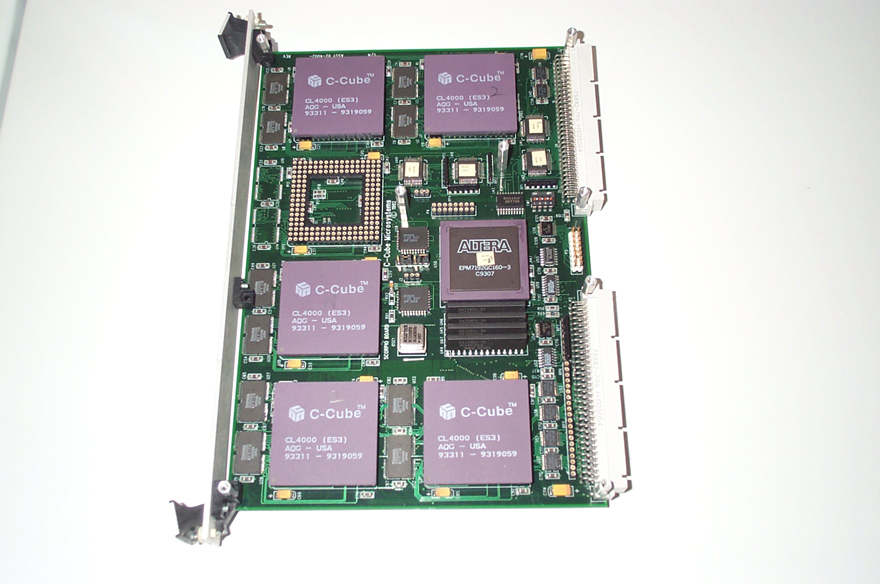
The first real-time HDTV encoders for terrestrial digital television (ATSC) were built by Harris using an IBM encoder chip. It took 6 chips to encode 1920x1080. The IBM chips didn't have an auxiliary bus, so you could see motion vectors limited to chip image boundaries (in this case, 6 tiles arranged like so).
  -------------------------
  |       |       |       |
  |   1   |   2   |   3   |
  |       |       |       |
  -------------------------
  |       |       |       |
  |   4   |   5   |   6   |
  |       |       |       |
  -------------------------
tgtweak 11 hours ago
Yeah at this time intel was just releasing their quick sync tech and a few vendors were putting 4 intel cpus on a pcie board and using it for video encoding! Matrox also had a considerable piece of this business doing video compression and editing/compositing using bespoke processors and boards.
Despite being more "power efficient" - both nvidia and intel's hardware solutions left a lot to be desired in terms of final quality for the same bitrate, compared to x264 that seemed to just put out substantially better quality video for the same bitrate even at the same h264 profile levels. There are still lots of x264 design elements, some even verbatim ported, into modern av1 and hevc encoders.
rufo 3 hours ago
drmpeg 6 hours ago
mcoliver 14 hours ago
Very cool. Took a similar approach to optimizing openutv by looking at flamegraphs. UTV is a fork of openrv which is an older release of the commercial RV. Like many things it uses ffmpeg and also native readers and writers for certain formats. Allowed me to get it to 8k@60fps buttery smooth playback with hardware acceleration. If you are still in the video/imaging space would love your feedback on UTV. openutv.com
pwython 17 hours ago
Ten years later, 2026 magic: AV1
https://engineering.fb.com/2026/06/22/video-engineering/adop...
And soon AV2
qmr 16 hours ago
That's all well and good, but let me know when I can buy a used $50 NUC or pi or such that has hw decoding of the same for my TV front ends.
kccqzy 16 hours ago
Intel has supported native hardware decoder for AV1 since Tiger Lake. That’s quite old. You could buy a used NUC with Tiger Lake. Even when new a NUC with 1115G4 or 1135G7 isn’t expensive. I found one with damaged WiFi for $20. https://www.ebay.com/itm/366767313411 You can buy it now.
ssl-3 15 hours ago
NavinF 13 hours ago
Cheaper to get a long fiber optic HDMI cable and connect your TV to your PC GPU. That's what I do. You get the best uncompressed video (typ 4K 120Hz or 8K 60Hz), zero lag so it can be used for stuff other than video, and don't have to maintain another box
Dylan16807 14 hours ago
Do you really care if your NUC uses an extra 2 watts to do software decoding?
ender341341 9 hours ago
HumblyTossed 17 hours ago
And maybe ten more and enough hardware will support it that it will be mainstream.
Dylan16807 17 hours ago
AV1? It's mainstream already. Lots of hardware supports it and you don't need hardware support for many other cases.
GeekyBear 15 hours ago
alt227 17 hours ago
pxoe 16 hours ago
AV1 decode works well enough even on quite old devices, and it has more favorable quality and size, individually or when considering both. I prefer it to h264 (or vp9 or even h265) at this point, and there isn't a particular need for hardware decode to benefit from it. On Youtube (probably the biggest and most accessible source of av1 video), when comparing size and quality on different codecs (h264/vp9/av1), av1 is either gonna have much smaller size while keeping some level of quality, or have better quality at similar size, or even have both be better.
paulryanrogers 14 hours ago
OGWhales 12 hours ago
cubefox 16 hours ago
The first Apple chips with AV1 support only came out in 2023. So the majority of Apple hardware out there doesn't support it. It will be a long time till support is at >95%.
Gigachad 12 hours ago
walrus01 an hour ago
If you really want to see magic, take a test sample of YUV420 video and AV1 encode it to an extremely low bitrate at like 720p, 24 fps to simulate something like the jerky handheld front-phone-cam in the example URL. Keep lowering the bitrate until the quality become unacceptable. Then compare it to the same bitrate/approx total file size in H264 and how bad it looks.
a3w 15 hours ago
2018 AV1 demo
shevy-java 17 hours ago
Dylan16807 17 hours ago
At any point in time there's only a couple video codecs you should be using. When we can repeatedly shave off 30% of video bandwidth, there's no reason to stop making one or two new ones every decade.
Edit: And you can also look at the video codec landscape as having two major standards that put out new versions sometimes. The MPEG/h.26x series and the VPx/AVx series. It's not quite that simple but it's close.
aktenlage 17 hours ago
There is no need to have a final one. It's no problem to keep supporting older codecs and add new ones in new products, as long as there's a "common ground" of widely supported codecs.
taneq 13 hours ago
I don’t think we’re far off a “final” video codec, in the sense that jpg and mp3 and zip are effectively “final” image and sound and data codecs. Sure, there are newer codecs with higher compression foot a given quality level, but at some point it’s good enough to not bother upgrading, especially when the new version costs exponentially more for negligible gain.
…maybe THIS one will be The Final Codec… doodoodoo dooo
ChadNauseam 8 hours ago
aidenn0 4 hours ago
thunderfork 10 hours ago
echelon 17 hours ago
I feel as though AI is going to blow these all out of the water soon.
And then we'll get AI-designed hardware codecs for them.
cowlevel 16 hours ago
Or the AI will be the codec - intelligence is compression.
cubefox 16 hours ago
Dwedit 16 hours ago
One uncommonly used feature of H.264 is support for lossless video. It's a bit hard to use due to tooling (not easy to discover and select the feature), and is sometimes incompatible with web browsers, but you can get actual lossless video using a mainstream video codec. You can verify that it really is lossless, and doesn't have any conversion step where it's quantized to 8-bit YUV.
"x264vfw" is one tool which supports this format, even inside of an AVI file. So older software that uses Video For Windows can create those files.
ledoge 16 hours ago
FYI, both VP9 and AV1 support lossless as part of their base profiles, so lossless files using those codecs should be compatible with all implementations (at least in theory). Though those profiles only support 4:2:0, so it depends on your use case if that really counts as lossless.
Dylan16807 14 hours ago
I struggle to think of a situation where the blur of chroma subsampling is acceptable but very high quality or prores isn't good enough, I need lossless.
Dwedit 14 hours ago
4:2:0 is not lossless. 4:4:4 with quantizing down to 8-bit YCbCr isn't lossless either. But 10-bit 4:4:4 is reversible back to 8-bit RGB without loss.
thunderfork 10 hours ago
aidenn0 3 hours ago
x265 supports lossless as well (though I believe it's not part of the H.265 standard). It's what I use for video capture.
doublepg23 15 hours ago
What is the purpose of lossless H.264 vs. ProRes or the like?
Is it similar to lossless audio were there's not a ton of optimization you can do?
shellac 15 hours ago
I've attempted to get researchers to use lossless H.264 to encode CT scans. They typically use directories full of tiffs. Even with intra-slice compression (i.e. tiff compression) they are pretty huge. But H.264 will let you recover the original images to the individual bit, and save a huge amount of space thanks to inter-slice similarities.
They are still using directories of tiff, though.
jedbrooke 13 hours ago
freeone3000 15 hours ago
Lots of hardware requires specifically h.264 as a transit; many of the MPEG standards are built around it. So this lets you get MPEG-PS, or lossless BDs, or some hardware/specialized software decoders for machines that otherwise couldn’t keep up (like set top boxes).
Sopel 15 hours ago
prores is not lossless. It's also an intraframe codec so compression is not great.
ErroneousBosh 11 hours ago
Sopel 15 hours ago
you can easily record lossless h264 via obs and any ffmpeg-backed player will play it just fine
the days where the OS matters for video playback are long gone
Hasz 16 hours ago
I really like the idea that compression is intelligence, there are so many tricks an interesting ideas related to it. A bunch of them are described in the article, but you can imagine a long tail of many more inscrutable tricks chained together to get really incredible shrinkage in data.
Hutter prize (I think mentioned in a 3b1b video somewhere else in this thread) is a great example. Given this was written before advent of LLM, I would love to see someone throw openAI/Anthropic levels of compute at a similar problem to see what the swarm can produce.
kouru225 16 hours ago
I remember reading an article on here by one of the founders of MPEG about why he was leaving MPEG after several decades, and part of it was that modern AI is indistinguishable from compression and he wanted to explore new compression algorithms using the recent explosion of knowledge
augment_me 16 hours ago
The newest submissions to Hutter Prize made crazy jumps by just replacing the LSTM with a transformer and training it.
35'000$ for a prompt and some training is a nice chunk of cash.
Next steps are replacing the encoders and all the other human-biased compression parts by just raw data and training, probably another 20-30% is up for grabs.
HelloUsername 17 hours ago
Previous discussions:
4.nov.2016 https://news.ycombinator.com/item?id=12871403 219 comments
17.mar.2022 https://news.ycombinator.com/item?id=30710574 219 comments
24.may.2019 https://news.ycombinator.com/item?id=19997813 180 comments
14.jun.2024 https://news.ycombinator.com/item?id=40681306 205 comments
tgtweak 14 hours ago
It's still magic
ksec 16 hours ago
H.264 High Profile is close to Patent Free. [1] I often wonder how much more efficiency could we get if we were to increase block size outside of spec.
[1] https://meta.wikimedia.org/wiki/Have_the_patents_for_H.264_M...
userbinator 3 hours ago
~370 MB/sec of raw data.[...]This is next to impossible to deal with.[...]You can't move it anywhere fast. Even SSDs have trouble dumping this straight from RAM to Disk
Always interesting to see what happened in ten years --- 370MB/s is well below what the slowest NVMe SSD can do today, and easily achieved over a 5Gbps Ethernet connection.
Incidentally, H.264 patents have either expired or will be expiring soon: https://meta.wikimedia.org/wiki/Have_the_patents_for_H.264_M...
jacquesm 2 hours ago
On average, yes. But without hiccups: only very few NVMe drives can do this over really long runs without stalls. I've been working a lot with high rate SDR earlier this year and it took a lot of testing of different drives to find one that did not have this issue. I was quite surprised because you'd think that the underlying mechanism, if it works at all should be able to work sustainably but once every 10 minutes or so there would be a (brief) stall which would cause the SDR to start dropping data because it wasn't serviced fast enough. The only one that didn't do this was the 'Lexar SSD NM1090 PRO 4TB', which was surprising because it was one of the cheaper ones that I tried.
MadameMinty 16 hours ago
Worth pointing out that PNG is also just awful and should probably die like BMP died. WebP was already available at the time this article was written:
PNG: 1039993 bytes - baseline
optimized*: 541539
WebP: 398974 - lossless mode, of course.
JPEG XL: 310778 - lossless, quick, and easy.
*after monumental compute effort; still probably some room for improvement but the effort is ridiculous.
ashleyn 16 hours ago
WebP stands on its own merits but it's profoundly annoying that as of Pop OS 22.04 I still have to open them up in Firefox instead of Eye of Gnome. Compatibility issues like this are littered everywhere. This laziness on the part of supporting WebP is a significant driver of continued use of PNG.
abhinavk an hour ago
Gnome is pretty ahead on JXL support though. They even ship their wallpapers in it.
MadameMinty 16 hours ago
Yes, it's very disheartening. We're approaching two decades of WebP, after all. At this point it's not even worth implementing its support because JXL is superior in every use case.
Dwedit 16 hours ago
Joel_Mckay 10 hours ago
SchemaLoad 10 hours ago
Open a bug report on Eye of Gnome. WebP has no issues opening on all of the native MacOS tooling. Since this is an open source program it should be fairly easy to submit a PR to bring in webP support.
aidenn0 3 hours ago
That's crazy; gwenview (The KDE image viewer) has supported webp for quite some time.
masoudd 5 hours ago
Eye of Gnome can open webp. You need webp-pixbuf-loader package installed.
diericx 4 hours ago
F3nd0 16 hours ago
With JPEG XL finally being allowed into mainstream web browsers, we’ll hopefully see more native platform support and be able to slowly phase every older codec out, since JPEG XL does very well at more or less everything (except for animation, compared to video codecs).
abhinavk an hour ago
Gnome ships wallpapers in JPEG XL. Decoding support has landed but export support is either sparse or untuned.
MadameMinty 15 hours ago
I hope so, but I disagree with the size of the "except": JXL performs better than APNG and GIF, and still supports transparency and lossless encode. Video codecs struggle here. So even with animation it still depends!
There's also a case for AVIF in some use cases (for this image it performs poorly). But if I had to choose one, I'd choose JXL.
spiralpolitik 5 hours ago
WebP is limited to 16383x16383. I've run into this limit a handful of times and I would expect it to become more of an issue as screen pixel densities increase.
MadameMinty 16 hours ago
For completeness, my background job of the highest imaginable PNG compression yielded optimized: 528313 bytes. Took only several minutes...
tvelichkov 17 hours ago
This reminds me that I still haven't watched `part 2` of a very nice video from 3Blue1Brown - "Compression is Intelligence". YouTube suggestions, definitely failed me with this one.
johnwalkr 14 hours ago
I've shared this article many times. I work in space and the vast majority of the time, new people insist that all images should be raw. After all, you go to great expense to get somewhere in the name of science, you don't want to discard any information. And that's true in some cases but typically not for a whole mission or even a whole image if you can crop a specific part. Usually 100 or 1000 images instead of one is more valuable even if the compression is lossy.
That's just image compression though. Very few space-grade cameras support video compression. In a lot of cases it works well even though you think you're after a series of still images.
jwrallie 8 hours ago
It’s mostly mission dependent as you mentioned, if the value of some images are different than others, compressing several pictures and selecting the best to get in raw is a good strategy, and you can also crop them to get interesting areas as mentioned.
It can also depends on the downlink bandwidth available and power/energy budget, so the optimal strategy will differ.
It can be misleading at times though, for example some interesting feature may happen to be just a compression artifact. A cloud looking like some strange human-made object for example, happened to us one time.
bugake 6 hours ago
In the end, YouTube still loses frames above 1080p, even if you have fiber-optic internet, the ultimate CPU and GPU, and loads of RAM, just because YouTube's code is garbage.
yashk1010 2 hours ago
Reading human written article (No LLM) is soo fun. Can't find it anywhere these days.
juanfra91 9 hours ago
I work with video sites and I'd never understood why an hour-long video could be so small. Saving only what changes between frames explained it all. It also explains why videos of rain or confetti look pixelated.
Dwedit 16 hours ago
One year left before the "last major patent" expires.
kouru225 16 hours ago
Wait is this true? Will I finally be able to use h264 on da Vinci resolve for free?
paulryanrogers 12 hours ago
I am right now. Though perhaps not with GPU acceleration.
tombert 14 hours ago
I remember reading this article when it was new, and I left fully agreeing, but more broadly: modern video compression is magic.
Like, it's baffling to me how much we can compress high-quality video nowadays. HEVC and AV1 and VP9 are all also very cool and they still sort of break my brain. I understand how they work but it doesn't feel like it should compress as well as it does.
Latty 14 hours ago
I've done AV1 encodes where I was convinced the conversion must have failed in some way for it to be that small, scrubbed through it and it all looks fine, watched through the entire thing to confirm that wasn't the case, just waiting for the shoe to drop, but then to find out, no, it's really just that good.
bugake 6 hours ago
It is time to make a standard neural network for video, which guesses the next frame and/or applies super-resolution like DLSS does, so the necessary information to transmit is reduced to the minimum necessary for DLSS to reproduce the image without loss.
ummonk 11 hours ago
I wish the video presented had been one with, say, 5x higher bitrate, as it would have sufficed to make the point without presenting a video with very glaring compression artifacts.
dizzant 14 hours ago
I'm surprised that 10 years later, the article still teaches an incorrect conceptual understanding of "quantization".
The context heavily implies that quantization is "discarding information" generally (e.g. clipping, masking). The wikipedia article he links in the footnote disagrees, and so do I:
> quantization is the process of mapping input values from a large set (often a continuous set) to output values in a (countable) smaller set, often with a finite number of elements.
Quantization is a function over values, or the image itself. Clipping and masking, by contrast, are functions over the space/frequency dimensions, i.e. the pixel indices ("preimage"). A rule like "apply a circular mask" or "drop the first quadrant" does not depend on the values!
The most extreme example of quantization is a threshold filter. Regardless of location, output "1" if the pixel is brighter than X, or "0" otherwise. This depends only on the value, not on the location. He also misses the opportunity to point out that chroma subsampling is another application of quantization, this time to chroma values (drop the low-order bits).
Codecs like H.264 and JPEG use spatially-varying quantization rules to effectively discard more information at high frequencies, so his explanation of H.264 is spot on, but a non-expert encountering quantization for the first time would probably come away with the wrong idea. For an article explicitly targeted to non-experts that goes out of its way to introduce the term, it's a pretty important oversight.
solarkraft 14 hours ago
Consider me confused. Isn’t quantizing a value, e.g. reducing the number of bits in an int, a form of discarding information from that value? Isn’t your comparison just about discarding information on another level (discarding entire values)?
edflsafoiewq 12 hours ago
I think the GP's point is, if you don't know what quantization is, the article gives the impression it consists of discarding some of the values, which is where the compression comes from. This is a good "0-th order" intuition, but quantization is a softening of this; instead of fully retaining or fully discarding a value, there is a sliding scale of how much information to discard. If you already know what quantization is, it's easy to see how discarding is a special case, but the article gives the impression discarding = quantization.
dizzant 10 hours ago
CharlesW 14 hours ago
The definition you quoted explains why quantization discards information: multiple distinct input values map to the same output value. Once that happens, you can no longer determine the original input from the output alone. The distinctions between those inputs are the information that has been lost.
dizzant 12 hours ago
I’m not saying that quantization doesn’t lose information. Instead, I’m saying that every step to lose information is not quantization. Functions on the preimage (clipping, masking) are not quantization.
sacredcows 16 hours ago
This reminds me of that old nursery rhyme. Billy was a chemist's son, but Billy is no more, what he thought was H2O was H.264
rishabhd 17 hours ago
It is tradition to re-read this every year. Along with the m1 blackmagic one.
jruohonen 16 hours ago
amelius 15 hours ago
I wonder if an AI can make a better codec, and if we would think of it as "magic".
bugake 6 hours ago
Transmission cost of an interpolated frame: 0 with DLSS. But adding a little extra information could help reduce artifacts.
Sure, DLSS uses game engine information, such as motion vectors and depth, which is unavailable for video. But neural networks can estimate motion directly from video frames and interpolate without that information. Providing additional data to fix artifacts would cost little.
tgtweak 14 hours ago
There are some interesting advances in neural video encoders and decoders - I suspect it will look a lot like the neural models in DLSS 5 for compression -> decompression/reconstitution. There have been some lossless text-compression neural models built that seem to surpass even high level compression algorithms so with time those could get there.
Dylan16807 14 hours ago
The fact that you said 5 worries me.
whall6 16 hours ago
Socrates was certainly a pioneer of conveying information efficiently
Dan42 14 hours ago
Well, that was disappointing. Everything in that article is generic to any video compression codec, even MPEG. I thought this would discuss why H.264 compresses so much more than predecessors, but not a word about that. Should have been titled "video compression is magic".
dzdt 17 hours ago
Article is dated (2016).
shevy-java 17 hours ago
The only question I have:
Should I use H.264 or H.265?
F3nd0 16 hours ago
For personal use, if those are your only two choices, then go with H.265 for higher efficiency, or H.264 for wider compatibility. If other codecs are an option, go with AV1 for higher efficiency. It’s currently the best and already pretty widely supported.
qingcharles 16 hours ago
The main reason to use H.264 in 2026 is legacy device support. Some devices cannot play H.265, but H.264 is playable almost anywhere, as a 20+ year old codec.
I was surprised that Twitter only lets you upload H.264 still, in 2026.
favorited 14 hours ago
Twitter's video story is not their strongest. I used to run an account that posted a lot of video content, and their compression quality was so mixed that I ended up writing a little mobile app that would transcode videos to Twitter's advertised optimal format (720p 30fps H.264 5Mbps + AAC LC) before uploading them.
Even then, it was a crapshoot whether or not the video would look like a pixel collage, and I'd need to delete the Tweet, tweak the video a bit, and try again.
quibono 17 hours ago
It depends on how you want to play or share the media.
E.g. I remember having lots of issues sharing smaller video files encoded with H.265 via both WhatsApp and Messenger. iMessage doesn't support H.265 (or at least it didn't work for me at the time).
adgjlsfhk1 15 hours ago
H.264 (if you want to support 20 year old devices) or av1. Don't use h.265. The patent situation around it is a total mess.
1317 14 hours ago
h264, if you had a reason to use something else you wouldn't need to ask
qmr 16 hours ago
That all depends on your use case.
How are you generating video?
How are you playing it back?
alt227 17 hours ago
H.264 for 1080p and less. H.265 for 2160p.
unethical_ban 15 hours ago
Patents aside, h265 from my reading is almost universally better than h264. My understanding which could be wrong is that for a given quality h265 will always be smaller, and particularly for >1080p it's recommended. Hardware support has been around since at least the Shield days (2019) so that shouldn't be an issue. Only use h264 if you are needing to hw-decode on really old hardware.
AV1 is the future/present: Fully open standard, better than h265. Only downside is hardware support: You need hardware made in the last few years.
Sopel 15 hours ago
that's like asking "should I use an audi or a tesla"
WhitneyLand 17 hours ago
"The H.264 video, 300 frames long is 175KB. A single frame of that video in PNG is 1015KB. It looks like we're storing 300 times the amount of data in the video. But the file size is a fifth. So H.264 would seem to be 1500x as efficient as PNG. How is this even possible? All right, what's the trick?"
Mostly the trick is they're comparing lossy to lossless compression which doesn't even make any sense.
nomel 17 hours ago
Yes, as they explain shortly after, in the next section "shedding weight".
They're not actually confused here. It's a writing style, where you pose an interesting problem/scenario, then explain it.
WhitneyLand 15 hours ago
I don’t think they are confused either just don’t think it’s a good way to introduce the point.
When good expositors choose motivating questions, say like 3 blue 1 brown, they don’t usually make apples to oranges comparisons. The best examples motivate while making sense before and after you learn.
nomel 15 hours ago
rob74 16 hours ago
Actually I had the same thought, but this is obviously an article for people who don't know the difference between lossless and lossy compression. Ok, you might argue that it's not a good fit for HN, but going by the many times it seems to have been posted here, some people disagree.
Dylan16807 17 hours ago
It makes tons of sense to compare those numbers. It's a big part of how you benchmark lossy compression. I guess in some sense they should use BMP instead of PNG but it's arguable.
WhitneyLand 15 hours ago
Sure that’s true. But if something makes sense for a technical benchmark that’s not a guarantee it’s the best way to introduce a concept. I just think other approaches could have been more clear for this case.
a3w 15 hours ago
Discussed elsewhere here: h.264 supports lossless storing.